
Sun Sentinel
Tribune Publishing Inc.News & Magazines
2.8268.00 Reviews
- Version
- 10.0.60
- Installs
- 50.00K
- Age Rating
- Everyone
Screenshots
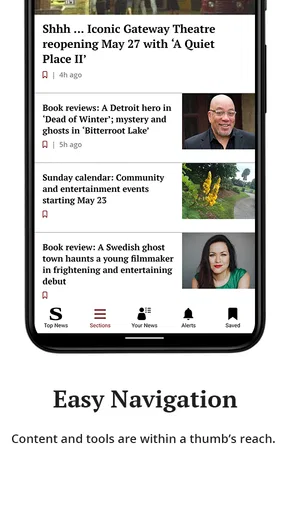
Our Review of Sun Sentinel
 Analysis by Appyee
Sun Sentinel is a free news and magazine app from Tribune Publishing Inc. that puts local and premium storytelling into a mobile reading experience. I approached it less like a quick headline reader and more like a digital edition of a newspaper: useful when I want regional reporting in one place, but not necessarily the best choice when I only need a fast, broad overview of the day.
The app has been available since January 20, 2011, and its current version is 10.0.60. It runs on Android 8.0 or later, carries an Everyone age rating, and has passed the fifty-thousand-install mark. Those details make it accessible to a wide range of readers, including people using older Android phones, although the modest average rating of 2.8 from roughly five hundred ratings suggests that the experience has not worked equally well for everyone.
What it feels like to use Sun Sentinel
My first impression is that the app is designed around reading rather than constant social interaction. That matters because a newspaper app has a different job from a general news aggregator. Instead of mixing every possible source into one endless stream, Sun Sentinel is meant to give readers a direct route to its own reporting and premium material.
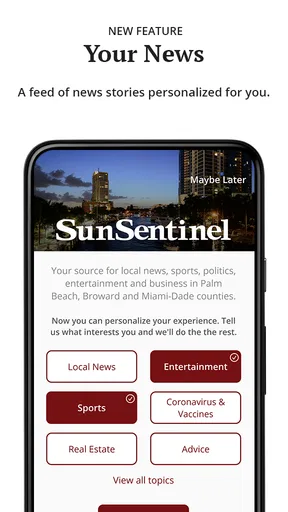
The store summary describes it as a customizable way to access exclusive storytelling, and that idea is important to the overall experience. Customization is most useful when it helps me reduce noise: I would rather see the subjects and local coverage I care about than repeatedly scroll past unrelated national headlines. At the same time, customization only pays off if I spend a little time shaping the app instead of treating it as a one-tap news shortcut.
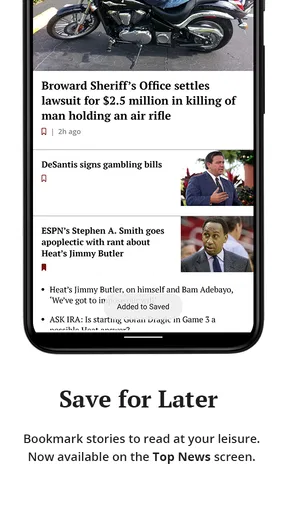
For a realistic everyday example, I can imagine opening it during a morning commute, checking local developments, saving a longer article for a quieter moment, and returning during lunch to finish reading. That workflow suits a publication-focused app much better than a feed built for rapid headline hopping. It also highlights the main trade-off: the value comes from the depth and relevance of the publication’s coverage, not from having the widest possible range of sources.
Who will get the most from it
I would recommend Sun Sentinel first to readers who already want this publication’s regional perspective and prefer a dedicated reading space over a browser tab. It is also a reasonable fit for someone who follows local issues closely and wants premium stories presented together rather than scattered across search results, social posts, and several unrelated applications.
The app is less convincing for people who want a completely neutral dashboard of many publishers. A general news aggregator is usually better for comparing several viewpoints in one screen, while a browser may be more convenient for occasional readers who do not want another dedicated app. If your only goal is breaking-news alerts from many places, Sun Sentinel may feel narrower than necessary.
That narrowness is not automatically a weakness. A focused publication can make it easier to recognize the editorial voice behind what I am reading. The important question is whether that voice and coverage match my interests. I would not install it simply because it is free; I would install it because I want this specific publication’s reporting and storytelling.
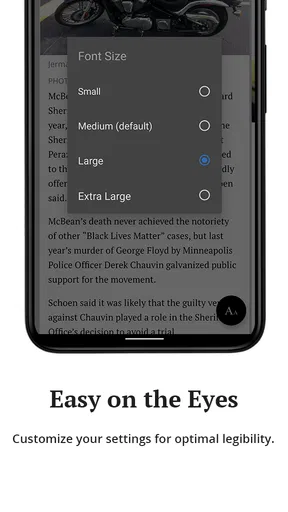
Reading controls and the importance of customization
The most useful way to approach the app is to treat its customizable design as a personal reading workflow. Rather than accepting the first screen as a finished product, I would spend a few minutes deciding which sections deserve regular attention. This small setup step can make the difference between a focused news routine and an app that feels like another noisy feed.
A practical tip is to separate quick checks from deliberate reading. I would use the app for a short scan when I have only a few minutes, then choose one substantial story instead of opening everything that looks interesting. That habit makes better use of premium storytelling and reduces the temptation to judge the whole service by how quickly it delivers headlines.
Another useful trade-off is screen time. Long-form articles are easier to appreciate when I read them in a calm setting, while short visits are better for deciding what deserves attention later. A phone app cannot remove the distractions of mobile reading, so I would avoid judging the publication solely during rushed moments when I am likely to prefer a compact aggregator.
Trust, accounts, and visible choices
When I assess a news app, trust is not only about whether the writing sounds credible. I also want to understand what choices I am making as a user: whether I can control the reading experience, how clearly paid access is presented, and whether I can distinguish ordinary browsing from a premium path. Sun Sentinel deserves that same careful evaluation.
The app is free to download, but it includes in-app purchases ranging from $4.99 to $199.99 per item. That range makes it especially important to slow down before confirming any purchase. I would read the wording on the purchase screen carefully, check whether the offer is a one-time payment or a recurring arrangement, and review the account connected to the transaction before proceeding.
This is not a reason to avoid the app. Premium journalism often uses paid access to support reporting, and some readers will consider that worthwhile. My concern is practical: a free download can create the impression that everything inside is free, while the presence of purchases means the app should be treated as a publication with optional paid access rather than as a completely cost-free news utility.
I also prefer to make account decisions deliberately. If the app asks me to sign in, I would first consider whether I need an account for the specific feature I want, then use a password I do not reuse elsewhere. If I later stop reading, I would check the app’s account and subscription controls rather than assuming uninstalling it handles every account-related matter.
Those are sensible habits for any publication app, but they matter more here because the app combines free access with premium storytelling and paid items. The safest approach is to treat every visible choice as meaningful: personalization, sign-in, purchase confirmation, and notifications should all be decisions I make rather than settings I accept automatically.
Data-sensitive moments during normal use
News reading can look harmless, yet it often involves personal signals. The subjects I select, the stories I open, and the times I return can reveal interests and routines. I do not assume those signals are used in any particular way without clear evidence, but I do think readers should pay attention to the choices the app presents around personalization and account access.
My own approach would be to customize only as much as I find genuinely useful. If selecting every possible topic makes the app more complicated, I would narrow the list to the areas I actually follow. That gives me a cleaner reading experience and avoids creating a more detailed preference profile than I need for ordinary use.
Notifications deserve the same attention. A local alert can be valuable during a developing story, but frequent interruptions can turn a reading app into a source of stress. I would enable only the notifications that help me, then revisit them if the phone starts demanding more attention than the news is worth.
I would also be careful when using the app on a shared device. A personalized news screen can expose interests to another person who picks up the phone, and an account left signed in may make paid or saved content easier to access. A screen lock, a deliberate sign-out when appropriate, and a quick review of the app’s visible account controls are simple ways to preserve personal control.
These points are not accusations about Sun Sentinel’s data practices. They are reminders that trust should come from visible controls and informed choices, not from assumptions. I would look for clear explanations inside the app or its store-facing privacy information before deciding how comfortable I am with personalization, sign-in, and purchases.
How it compares with familiar news alternatives
Compared with a general news aggregator, Sun Sentinel feels more focused and publication-specific. An aggregator wins when I want many publishers, rapid comparison, and a broad mixture of subjects. Sun Sentinel makes more sense when I already value the publication’s local identity and want its reporting presented without an algorithmic mix of unrelated sources.
Compared with reading the newspaper in a mobile browser, a dedicated app can be more convenient for repeated visits. A browser remains the better option for occasional access, especially if I do not want to manage another installed application or account. The app’s advantage depends on whether I return often enough for its focused design and customization to justify that commitment.
Compared with social media, the app offers a more intentional route to news. Social platforms are useful for discovering what people are discussing, but they can blur the line between reporting, reaction, promotion, and rumor. A publication app gives me a clearer starting point for reading the publisher’s own work, although I would still compare important stories with other reputable sources rather than treating one outlet as the entire picture.
Compared with a paid newspaper subscription on a larger screen, the phone experience is naturally more portable but less comfortable for long sessions. I would use Sun Sentinel on mobile for checking local coverage and reading selected features, then move to a larger display if an article deserves extended attention. That is a workflow preference, not a flaw in the app itself.
Limitations I would consider before installing
The average rating of 2.8 is the clearest public warning sign attached to the app. It does not tell me exactly which problems affected individual users, but it does suggest that I should keep expectations measured. I would install it with the understanding that the experience may not feel equally polished on every phone or for every reading habit.
The presence of premium content can also create friction for readers who expect a completely open news feed. Before investing time in building a reading routine, I would make sure the available free material meets my needs and understand when the app may ask me to pay. This is particularly important for someone downloading it casually after seeing a shared article.
Another limitation is editorial breadth. A focused publication app cannot replace a wider news service for national, international, technology, science, or entertainment coverage from many sources. I would pair it with another outlet if I need a rounded daily briefing, rather than expecting one regional publication to cover every subject with equal depth.
Older Android support is a practical advantage, since the minimum requirement is Android 8.0. However, compatibility alone does not guarantee that every device will feel equally smooth. I would keep the app updated to version 10.0.60 when possible, especially if I notice reading, login, or purchase screens behaving inconsistently.
My cautious verdict for potential readers
Sun Sentinel is most worthwhile when I want a focused connection to this publication’s local and premium reporting, not when I am searching for an all-purpose news dashboard. Its free entry point, Everyone rating, customizable approach, and long presence as a mobile news app make it easy to try. The real decision is whether the publication’s coverage is valuable enough to justify the app’s narrower scope and potential paid path.
I would recommend a careful trial: install it, inspect the main reading areas, adjust personalization modestly, and pay attention to how clearly the app presents account and purchase choices. I would not rush into an in-app purchase simply because a story is interesting. First I would decide whether I expect to return regularly and whether the payment terms shown on screen fit my needs.
For privacy-conscious readers, my advice is equally measured. Use only the controls that serve your reading routine, review notifications, protect any signed-in account, and look at the app’s visible privacy explanations before sharing more information than necessary. That approach evaluates trust through actual user choices rather than guesses about behind-the-scenes behavior.
In the end, I see Sun Sentinel as a specialized newspaper companion rather than a universal replacement for every news source. Readers who want this publication’s storytelling may find the focused experience worthwhile, especially if customization helps them build a calm daily routine. Readers who want broad comparison, minimal account involvement, or no possibility of paid content should choose a general aggregator or browser-based alternative instead.
My recommendation is therefore conditional but positive: try it if the Sun Sentinel editorial perspective is already relevant to you, keep your account and purchase decisions deliberate, and judge the app by the quality and usefulness of the reading routine it creates. That is a more realistic expectation than treating it as a free substitute for the entire news ecosystem.
Verdict
Strengths of Sun Sentinel
- Covers South Florida news, weather, traffic, and local events in one place.
- Offers timely updates for readers who want regional reporting on the go.
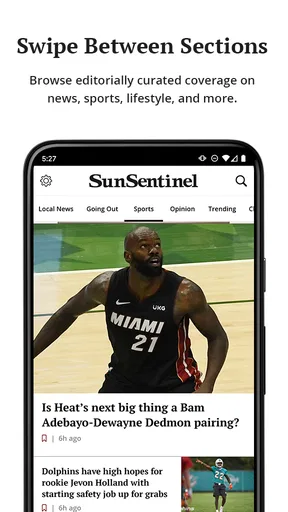
- Easy-to-browse layout makes it simple to scan headlines and sections.
- Push notifications can help users stay informed about breaking local stories.
- Includes access to investigative and community-focused journalism.
Limitations of Sun Sentinel
- Some articles or features may require a paid subscription to access fully.
- Advertising can make parts of the reading experience feel cluttered.
- Breaking-news notifications may become frequent for users with alerts enabled.
- Coverage is highly regional and may be less useful outside South Florida.
- App performance and content availability can vary with internet connectivity.
Other Releases by Tribune Publishing Inc.
View All
New York Daily News
News & Magazines3.3

Chicago Tribune
News & Magazines2.6

Hartford Courant
News & Magazines2.6

Orlando Sentinel
News & Magazines2.3
Similar Picks in This Category
View All
Google News - Daily Headlines
Google LLC4.0

X
X Corp.4.8

Flipboard:Your Social Magazine
Flipboard3.4

Opera News: breaking & local
Opera4.5

Hindi News by Dainik Bhaskar
Dainik Bhaskar Group4.0

Way2News Daily News App
Way2News ( Formerly Way2SMS )4.6
Frequently Asked Questions
What is the Sun Sentinel app used for?
The Sun Sentinel app provides access to news and reporting focused primarily on South Florida, including Broward, Palm Beach, and Miami-Dade-related coverage. After installing it, readers can browse breaking news, local stories, politics, business, sports, entertainment, weather, and opinion content. It is designed for people who want a convenient way to follow regional developments from an Android or iOS device.
Is the Sun Sentinel app free to download and use?
The app can generally be downloaded without an upfront charge, allowing users to install it and explore available content. However, access to all articles and premium features may depend on the publication’s subscription or digital-access policy. Some stories may be freely available while others can require a subscription, so users should review the current in-app terms before assuming unlimited access.
Does Sun Sentinel require a subscription?
A subscription may be required to read beyond a limited number of articles or to access subscriber-only reporting and digital benefits. The exact rules can change, and they may differ depending on whether you subscribe through the website, the app store, or another promotional offer. If unrestricted reading is important to you, check the subscription details shown during sign-in or checkout.
What type of news and features are available in the Sun Sentinel app?
The application is centered on local journalism and typically organizes content into sections such as breaking news, local communities, crime, politics, education, business, sports, lifestyle, entertainment, and weather. Depending on the version installed, it may also include alerts, saved articles, multimedia content, newsletters, and personalized recommendations. Availability of individual features can vary by device and app update.
Does the Sun Sentinel app send notifications, and can they be controlled?
The app may request permission to send push notifications for breaking news, major local events, weather developments, sports results, or other important updates. Notifications can be useful if you want immediate information, but frequent alerts may feel distracting. You can usually manage them through the app’s settings and your Android or iOS notification controls, including disabling all alerts or selecting fewer categories.
